For independent martial arts coaches
Martial arts attendance, without the paperwork.
Keep your attention on the mat. Check members in, deduct class credits and see who needs to renew — on the phone you already use.
Free for up to 15 students, 3 classes and 1 credit package. No login. No card needed to start.
See a class in three steps ↓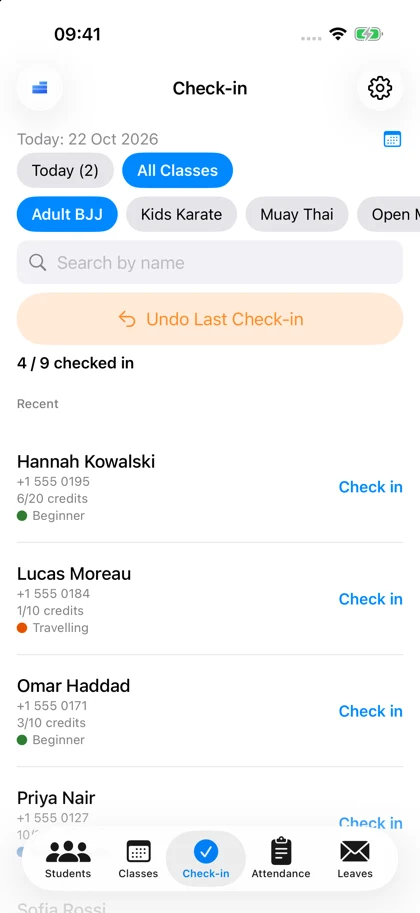
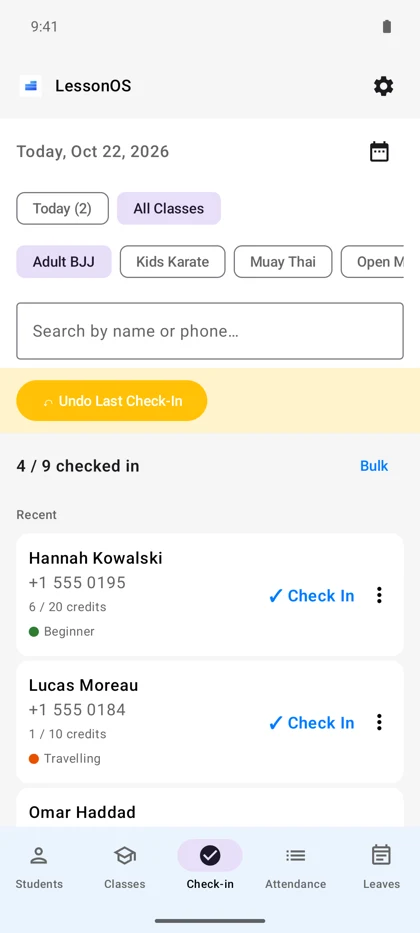
Real app screens · Sample studio and members
One tap at the door Record attendance and update class credits.
Know who needs to renew See remaining credits and membership end dates.
Keep teaching, even offline Your roster and attendance stay on your device.
From your roster to your first check-in
Set up the class you already teach.
Use LessonOS for a kids’ karate group, an evening BJJ class or a small taekwondo studio. Start with one class instead of moving every record at once.
Add your members
A name is enough to start. Add a credit balance or membership dates when you need them.
Create a recurring class
Choose the days and time, then enroll the members who attend that class.
Tap to check in
Choose the class and tap each member who arrives. Credits update with the check-in; undo is available for mistakes.
A 10-class pass, kept up to date.
For a class that uses one credit, a member with 10 credits has 9 after check-in. You can see the balance alongside their name, without updating a separate notebook.
Illustrative example. You choose the credits used at check-in.
Between classes, too
Keep the small details from becoming extra work.
-
Track class passes and renewals
Check remaining credits and end dates. Use the renew-soon list to see who may need a reminder.
-
Handle breaks and cancelled classes PRO
Freeze a membership during a break, or cancel one class date and choose the effect on members’ credits or end dates.
-
Let members check themselves in PRO
Use kiosk mode on a front-desk device when you want members to check themselves in.
Before your first class
Is LessonOS free to try with my class?
Yes. The free plan supports up to 15 students, 3 classes and 1 credit package, including check-in and attendance. Pro adds higher limits and features such as kiosk mode, backups and membership freezes.
Does it work on both iPhone and Android?
Yes, and iPad too. Both platforms support attendance, class credits and membership tracking. Each device stores its own records, and purchases do not transfer between Apple and Google accounts.
Do I need internet at the studio?
Not for day-to-day attendance and local records. Downloading the app, making purchases and using cloud backups require internet.
Can I bring my existing spreadsheet?
Pro includes CSV student import. If you are starting with a small group, you can also add names directly and try one class first.
Give your next class less paperwork.
Start with one class. Keep the records on your own device.
Free for 15 students · 3 classes · 1 credit package
Compare plans and pricing